Sunday, 19 October 2014

Gionee Elife S5.5 Review

Usually, it’s the brand that inspires trust in a product. It’s why a Samsung or Nokia phone is preferred by so many, irrespective of its merits as a good phone. But that trust was built on delivering great products over the years. With the Elife S5.5, Gionee is hoping the product is good enough to inspire trust in their brand. 


Gionee Elife S5.5 Buy From Flipkart : White Black

Gionee Elife S5.5 Buy From Amazon : White Black

Specs: 5-inch Super AMOLED Plus touchscreen (1920×1080 pixels, 441ppi) | 1.7GHz octa-core Mediatek MT6592 processor | 2GB RAM | 16GB internal memory, no microSD card | 13MP camera, 5MP front camera, FullHD video recording | 3G, Wi-Fi, Bluetooth 4, GPS, microUSB | Single micro SIM | 2300mAh Li-po battery Price: MRP – Rs. 20,000

Design: The Elife S5.5 claims to be the slimmest smartphone in the world—the “5.5” in the name indicates the width of the device: just 5.5mm. Almost everyone who saw this sleek handset asked how much it cost and were surprised by the price. Its slim profile and magnesium alloy construction makes the S5.5 great to hold and use. 

Not everything is perfect, of course. The glass back looks good at first, but gets scratched easily and will soon turn into an eyesore. The front is also prone to attract fingerprints easily. But perhaps most importantly, it heats up quickly and can get uncomfortable to hold while travelling.

Screen: The 5-inch screen of the S5.5 is is sharp, the colours are accurate, and the viewing angles are good. In direct sunlight, it’s fine on full brightness. The only issue with the screen is the auto brightness mode, which isn’t smart enough to always adjust to the best setting for your environment. You’re better off leaving it at 60% brightness manually. 

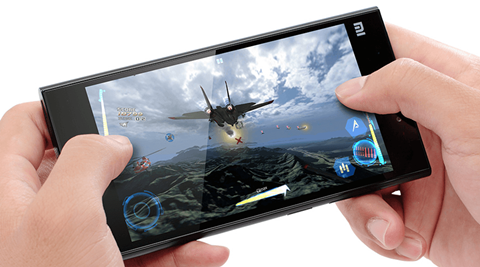
Performance: An octa-core processor and 2GB of RAM takes care of most needs. The phone doesn’t lag or hang, but it does have one problem. When you play games that require lots of swipes, the screen will often freeze for half a second — and that’s often the difference between winning and losing!. 

Camera: The S5.5 excels at taking photos while in motion. The shutter is quick and the auto-focus is good enough to capture at least the centre of the image in good detail. The fringes, naturally, are a bit blurred—but not as much as what you’d expect from most other phones. Apart from shots taken while moving, the S5.5 is also good for still photography and videos, although it’s not the best we have seen. Low-light shots naturally suffer with auto-focus, but they also have noise and lack details. You’ll need to apply an Instagram filter to be able to use them. The front camera is weak in dimly lit environments, so selfies in the club are going to be full of noise. 

Gionee Elife S5.5 Buy From Flipkart : White | Black

Gionee Elife S5.5 Buy From Amazon : White | Black
Read More »

iBall Slide 3G 7803Q-900 review: Good tablet, but I wouldn’t use this as a phone

Despite the onslaught of the phablets ranging from 5 to 6.99 inches there are still tablets in the market that offer voice calling. The latest in this group is the iBall Slide 3G 7803Q-900, a 7.85-inch Android tablet with dual 3G SIM slots.


Specs: 7.85″ IPS touchscreen (1024×768 pixels) | 1.3GHz quad-core MT8312 processor | 1GB RAM | 16GB internal memory, expandable microSD slot up to 32GB | 5MP rear camera with LED flash, 2MP front camera | Dual-SIM (GSM+GSM) | 3G, Wi-Fi, Bluetooth, GPS, microUSB 2.0 | 4000mAh battery | Android 4.2


Design
The tablet has a unremarkable style that is more functional than stunning. It is not the slimmest tablet around, but cannot be called thick in any way. The size makes it relatively comfortable to use as a phone if needed. One-hand operation is impossible and you cannot adjust the volume with one hand. The camera, two SIMs and SD card slot are behind a removable flap on top.

Screen
The 7.85-inch screen is one of the better features of this devices and is good for those who like to consume a lot of video content on the go. I guess that will be the strongest reason for people to buy a calling tablet with a screen that is almost 8 inches. Sadly, the audio is not as good as the screen.

Performance
The performance of this Slide tablet is as good as any mid-range smartphone. There is, however, a slight lag when you shift between apps or go from the home screen to the app drawer. The tablet also heats up a bit when you are playing video.

Camera
The front camera is good enough for that occasional skype call, but not for selfies. The rear camera is incapable of doing much in low light. But then you don’t buy a tab like this for its camera.


Memory
Out of the 16 GB, 12.5GB is available to the user. You can’t expect much more in a tablet that costs so much. You might need to spend on a SD card if you want to have videos at your beck and call.

Interface
The interface has been customised for a phone and not a tablet. There are no major teams except the app tray button, which carries the iBall logo. There is not much bloatware and that is a welcome change coming from an Indian manufacturer.

Battery
The 4000mAh battery is good enough to last over a day and that has to be one of the advantages of owning a phone this large.

Verdict
The iBall Slide 3G 7803Q-900 is a decent tablet, especially given its price. I am not sure its size makes it a comfortable phone to use. But then look at the calling feature as an added advantage. I would not recommend this as a primary phone, but go ahead if you are looking for a second device.


Read More »

Xiaomi Mi3 quick read review: It no longer makes sense to buy anything more expensive

The first phone by the Chinese manufacturer in India has created a buzz among tech aficionados, and understandably so. But are great specs enough to make a great phone?

Specs: 5-inch IPS FullHD touchscreen (1920×1080 pixels, 441ppi) with Gorilla Glass 3 | 2.3GHz quad core Qualcomm Snapdragon 800 | 2GB RAM | 16GB internal memory, no microSD card | 3G, Wi-Fi, Bluetooth 4, NFC, GPS | 13MP rear camera with dual LED flash, 2MP front camera, 1080p video recording | 3050mAh battery | Android 4.4 Kit Kat with MIUI v5

Xiaomi-Mi3-04

Design
The Xiaomi Mi3 looks like a premium device. It’s got a magnesium alloy frame that protects the insides, and a sleek black front with a small “Mi” logo at the top—much less in-your-face than most brands.

While Xiaomi wants to fool you into thinking the back is metal, you know it’s plastic; that said, it’s good quality plastic. The buttons have a resounding click, but we aren’t quite sure how long they will last; even in a week of use, we already felt their response had deteriorated. The speaker grill is located at the bottom, so you can keep your phone face or back down on the bed and still hear it ring clearly.

Screen
Packing a sharp 5-inch FullHD screen with vibrant colours, there are no complaints with the display. It’s as good as what you’ll get on any device.

Performance
With a Qualcomm Snapdragon 800 processor, the Mi3 easily handles any task you ask it to do. The 2GB of RAM means that you can also safely multi-task. Everything is buttery smooth and you won’t feel a lack of power at any point. It should be noted that the Mi3 is the first Snapdragon 800 device I’ve used that doesn’t heat up easily.

Camera
Have you ever seen an LG and a Samsung TV next to each other in a showroom? Notice how colours on the LG looks duller but sharper, while the Samsung looks more vibrant but has noise around the edges. The Mi3’s 13MP camera is akin to the LG—your images won’t have vibrant, luscious colours and that can be a disappointment. But they’ll be sharp and capture detail exceptionally well.

With videos, the Mi3 has one issue: the microphone. It picks up too much ambient noise while shooting, so you often don’t get the audio you want.

Memory
The only major concern with this smartphone is storage. It comes with 16GB of built-in memory, of which 13GB is available to the user. If you take a lot of photos and videos, load up some music, and install some graphics-intensive games, you’ll quickly run out of space. You can rely on cloud services and make do though, which is not too bad a sacrifice.

Read More »

Lukup launches on-demand television service in India

The Lukup TV service aims to deliver a large number of TV channels in addition to those available on cable and DTH platforms.
Lukup Media has launched India’s first on demand TV service powered by its connected Lukup Player.

The Lukup TV service aims to deliver a large number of TV channels in addition to those available on cable and DTH platforms. These additional TV channels will have content from multiple genres including movies, shows, lifestyle and sports.

Using the Lukup Player, users will also be able to stream content on more than one screen or device – TV screens, tablets, mobile phones, wireless speakers – at any one time. The service includes unlimited recording capacity starting from 500 GB which can be upgraded without limit. Users can also download content on their mobile devices which they can access offline. With no minimum monthly subscription charges, users can pay per view.
The Lukup TV service is available in Bengaluru now and will be available across India in phases. The Lukup Player will be online and in retail stores from October, 2014.
Read More »

Will Facebook overtake YouTube as top video sharing website?


Facebook may overtake YouTube in video sharing through its news feed soon as video shares on the social networking website are fast catching up with YouTube, say researchers.

An analysis based on 20,000 Facebook pages and 180,000 posts over one year found that the social networking site is now a real threat to YouTube in terms of video consumption.

"The content marketers are directly uploading video content to Facebook, meaning that Facebook is retaining the traffic at the expense of YouTube," reported social media analytics company Socialbakers on its website.

"This is a big deal for YouTube. They could lose a big percent of their distribution," Socialbakers CEO Jan Rezab was quoted as saying.

This means users will stay on Facebook instead of leaving, he added.

According to the report, "Marketers are going to continue to use the network that is most effective for gaining engagement. Basically, there are no signs of the trend reversing from its current path."

In September, Facebook announced that it was serving up to one billion videos a day.
Read More »

Messaging app LINE reaches 30 million users in India, to partner game developers

Messaging app LINE on Friday said it has touched the 30 million userbase milestone in India and is on track to reach the 50 million-mark by the year end.

The Japanese company, which has over 560 million users globally, had launched its services in India in May last year.
"We make sure that our new features and services, be it through stickers or games, to take our users beyond the usual messaging experience and that has helped us reach the 30 million milstone in such a short span of time," LINE Business Head India Daman Soni told PTI.

He added that the company is on track to reach the 50 million userbase by December-end this year.
India, which is the fastest growing market for smartphones, has seen a huge growth in userbase for messaging apps like WhatsApp, WeChat LINE and Hike.

Soni said LINE is looking at partnering game developers in India to co-invest in development and marketing of games on its platform.

"Globally, our gaming property is very popular and we are looking at building that up in India as well. We are working with companies in India to find opportunities to co-invest in localised content," he said.

More than 40 dynamic games are available through LINE's gaming platform. With operations in 230 countries and regions (as of May 2014), LINE has 72 LINE family apps like LINE camera, LINE SnapMovie, LINE PLAY and LINE GAME for communication, digital content, game, tools and media.

Soni said the company is also engaging with content creators to design stickers with local messages.
Besides, LINE India is also looking at monetising options through tie-ups with corporates, offering them their platform to connect with consumers. Its partners include Groupon, Jabong and foodpanda.
Read More »

Wednesday, 15 October 2014

Review: Canon Pixma E400

Canon Pixma E400 


Buy From Flipkart | Buy From Amazon

 HP is aggressively advertising its home printers for quite some time now. Canon too has some offerings in this space. The new printer from Canon that we are putting to test is the E400, a multifunction inkjet printer. Good looking and compact, the E400 doesn't require much space.
Even setting up this printer is a child's play. Just unpack the printer from the box, connect it to power, insert the cartridges and connect it to the system. The paper input tray is at the back and the output tray is on the front.
Canon has also added a few controls on the top that include power key, stop, black and colour command. There are notifications for black and colour ink too. While Canon has added the driver CD to the box, the printer automatically installs the software when plugged in a Windows 7 laptop. However, I had to install the software to use it with a Windows 8 machine.
In both the systems, the drivers were installed in less than five minutes. Supporting print, copy and scan, this printer is quick to operate.
In less than 15 seconds, it managed to receive the print command and even print the document. The characters were neat and the print appeared to be good even on normal mode. I tried using the printer for photo prints but the results were not good. This printer was quick with scanning, which is good for home use.
A good printer for home use

Buy From Flipkart | Buy From Amazon
Read More »

Why Asus FonePad 7 is a good buy at Rs 11,999

Value for Money

After introducing Fonepad 7 in India last year, it was followed by an improved version of the tablet. The company has now come up with the third Fonepad 7, which supports dual SIM slot.

Asus FonePad 7 Dual SIM
Price: Rs 11,999  
Specs: 7-inch IPS display; 5 MP camera; Android Jelly Bean; 1.2 GHz dual core processor; 1 GB RAM; 8 GB onboard storage; dual SIM slot; WiFi, 3G, Bluetooth
You might be thinking why we review Asus Fonepad 7 so often. After introducing Fonepad 7 in India last year, it was followed by an improved version of the tablet. The company has now come up with the third Fonepad 7, which supports dual SIM slot. In terms of the design, this one looks very similar to its predecessors.
The 7-inch IPS panel with 1280 x 800 pixels is surrounded by a thick bezel, wasting a lot of space. The tablet has got custom UI onboard. There is a notification tray giving access to toggles for Wi-Fi, mobile data, airplane mode, among others, and these can be customised as well.
The tab is an average performer and there was a slight lag while switching between the running apps. This is a dual SIM voice calling tablet with decent call clarity. However, it is uncomfortable to hold it next to the face. The camera captures decent images in bright daylight.
For the price it comes, we can't complain .
Read More »

Tuesday, 14 October 2014

Ten reasons why you’ll love the BlackBerry Passport

Over the past two years, BlackBerry has received a lot of flak for not making innovative products. However, with the newly launched Passport, things are finally looking up for the erstwhile RIM. 

http://www.hindustantimes.com/Images/popup/2014/10/Rubberised-Panel.jpg

We give you 10 reasons why the white collared and many amongst you will totally love this product. 

1. Square design
One of the biggest upside of this product is the unique squat square design. The 4.5-inch screen is instilled in a square chassis and is a breather from the staple rectangular design. Though at first most would want to disapprove the appearance of this product, but once you’ve got it in your hands we bet you’ll totally love it. Of course, owing to its square design, single hand functioning gets limited. But this is BlackBerry, and they’re more about their QWERTY keyboard than their full touchscreen capabilities. More so, we’re all acquainted with those large phablets that barely fit in the pocket, but are selling like hot cakes. So we think BlackBerry finally has a winner with these design aesthetics. 

Click to Buy Now on Amazon

2. BlackBerry BlendThis is the highlight of the software’s prowess. Blend is a platform that enables access to emails, messages, files etc. from your Passport to a PC, Mac or a tablet. You just need a Blend platform for the respective OS - Windows or Mac, and you can easily access it with the help of Mobile network or Wi-Fi. Imagine you accessing files on different devices and editing them at the same time without any security threat, thanks to BlackBerry’s secured networks. Only if JLaw and Kate Upton knew about it! 


3. BlackBerry 10.3
This is a refined version of the previous iterations of BlackBerry OS 10. It looks nicer, performs faster and demands a lot of gestures and swiping to use. The center of attraction remains the Hub. Though many people have mocked it out-and-out, to us it makes a lot of sense to have all of our emails, Twitter/Facebook messages, and of course the WhatsApp chats in one place. Isn’t it? The icing on the cake - it features a new virtual assistant. 

4. 13MO OIS cameraSomehow, BlackBerry has always managed to get their camera just about right, and this is the case with the Passport. The 13MP rear camera is quite a treat to use, and should leave the closet photographer inside you quite intrigued. We were pretty happy with the clicks, especially the ones in low exposure. 

http://www.hindustantimes.com/Images/popup/2014/10/Click4.jpg

In most cases the details of the clicks were sharp and crisp, but only a handful of captures failed to impress us. We also noticed that in some clicks the colour reproduction was a tad bit subdued, but it was sidelined with the overall picture quality. The focus is quite agile, and at various instances the camera prompts you to enable HDR – something that comes in moderately handy. This camera comes with a factory setting to capture photos in 1:1 ratio; while they wouldn’t bother you on the Passport, the default size might not be useful on other phones. 


5. Return of the QWERTY

http://www.hindustantimes.com/Images/popup/2014/10/QWERTY-KEYBOARD.jpg
Yes, this is the feat that’ll let you jump in joy. The QWERTY keyboard brings back the ease and the sensation of typing – something that no other physical or virtual keyboard delivers. The keyboard is touch-enabled, that lets you scroll through the webpages, emails, PDFs by just swiping your fingers – something that could be irritating at first, but settles down as the phone starts to grow on you. 

6. Super battery life
One of the biggest concerns of a data-hungry smartphone user is the device’s battery performance. As compared to other devices in the arcade, the Passport is a clear leader. Moderate-to-heavy usage should let you squeeze the battery life for about two days – you can finally bid adieu to those clinging USB wires and dud-looking battery packs. 

Click to Buy Now on Amazon

7. Super specs
Specs are at par, if not the best, with the devices that are making waves in the industry today. A 4.5-inch screen packs in a mammoth 1440X1440 pixel resolution. Under the hood is a 2.2 Ghz Snapdragon 801 quad-core processor coupled with 3GB RAM that makes multitasking a job ‘well done’. The 3450-mAh battery is what keeps your Whatsapp ticking for two days, without a single recharge. If the internal memory of 32GB doesn’t feed your soul, the people at BlackBerry have been kind enough to give you the ease of expanding this memory to 128 GB via a micro SD slot. A 13MP rear snapper and a 2MP front capturer does the trick for most of your video recording, or selfie-clicking shenanigans. 

http://www.hindustantimes.com/Images/popup/2014/10/Passport2.jpg

8. Amazon AppStore
As noticed, BlackBerry lost out majorly to its competitors with a half-baked App Store that barely kept anyone interested in it. Though the BlackBerry World hosts an array of productivity tools, it’s the Amazon AppStore that serves as a silver lining for this smartphone. As compared to Google Play Store’s gargantuan 1.2 millions apps available, the Amazon AppStore has about 240,000 apps. Though the numbers look disappointing, the latter features a handsome number of Android apps. 

9. BlackBerry Enterprise SolutionYou’d agree with us – this is the fastest, safest, and the least vulnerable system enterprise. BlackBerry was the ‘apple of the eye’ of every CEO, not owing to its bold looks, but because of its secured network encryption. It’s because of the same goodwill that a lot of loyalists are still holding on to the brand. And yes, with the recent bout of iHacks, we reckon your search for a secure OS would end here. 

http://www.hindustantimes.com/Images/popup/2014/10/click1.jpg

10. Getting Work Done
The ideal BlackBerry user doesn’t kill time by playing games, doesn’t Shazam that catchy song on the radio and surely wouldn’t want to find a possible white-collared associate on Tinder either. The ideal user would want the phone for pure business utility and efficiency. This massive 4.5-inch screen phone could very well be seen in the hands of all top-level executives. 

On the downside
http://www.hindustantimes.com/Images/popup/2014/10/Passport.jpg

BlackBerry Assistant
This is BlackBerry’s dyslexic version of Siri. It has a horrible voice recognition feature that take its own sweet time to understand the desi accent. More so, it works at the pace of a tortoise so don’t expect lightning fast search results. 

SizeThough the square design doesn’t irk as much, it’s the sheer wideness of the phone i.e. 3.5 inches that makes it a bit of a hassle to fit in the pockets. 

Blackberry Passport is available for Rs. 49,990. Click to Buy Now on Amazon
Read More »

Top android mobile phone under 10000

A couple of years ago, budget smartphone catalogue was only limited to domestic players such as Micromax, Karbonn, and LAVA. Now with biggies such as Nokia and Motorola looking to grab some market share, users are spoilt for the choice. Today, you can get phones from top-tier brands without crossing the Rs 10,000 mark. Now if that’s your budget, here’s the list of handsets you should consider buying.

1. Asus ZenFone 5 - Click To Buy Now

The 8GB variant of Asus ZenFone 5 has been priced at Rs 9,999. The smartphone has a 5-inch screen with 720p resolution, runs on Android 4.3 (Jelly Bean) and powered by a 1.6GHz dual-core Intel Atom Z2560 processor with HyperThreading technology.

ZenFone 5 has 2GB of RAM, microSD card support up to 64GB and comes with a 2,100mAh battery. It features an 8MP camera with LED flash, & also has a 2MP secondary camera.

2. Moto E - Click To Buy Now

With a 4.3-inch (960x540p) display, Motorola's cheapest smartphone Moto E is exclusively available at Rs 6,999 via Flipkart. The smartphone is powered by a 1.2GHz dual-core processor with 1GB RAM and comes with 4GB internal storage; it also supports microSD cards up to 32GB. The phone has the latest version of Android Kitkat.

On the back of Moto E is a 5MP camera, sans LED flash; the secondary, front camera is also missing. Connectivity features of the smartphone include 2G, 3G, Wi-Fi, Bluetooth 4.0, GPS, and microUSB 2.0. The phone runs on a 1,980 mAh battery and is available in two colours - black and white.

Micromax Unite 2 -  Buy Now on FlipkartBuy Now on Amazon

Micromax Unite 2 has a 4.7-inch screen (800x480p resolution) and is powered by a 1.3GHz quad-core Mediatek processor with 1GB RAM. It features 4GB on-board storage, expandable up to 32 GB via microSD cards.

Micromax Unite 2 has a 5MP main camera with LED flash and 2MP front camera. On the connectivity front, the Android 4.4 (KitKat) powered smartphone has 2G, 3G, Wi-Fi, Bluetooth 4.0, GPS and microUSB 2.0. It has a 2,000 mAh battery and is available in grey, green, red, and white colours.

The distinguishing feature of the smartphone is support for 21 Indian languages, such as Maithili, Bodo, Dogri, Sanskrit and Sindhi.

Nokia Lumia 630 - Buy Now on Flipkart | Buy Now on Amazon

The smartphone sports a 4.5-inch (480x854p) display and is powered with quad-core 1.2 GHz processor with 512MB of RAM and runs Windows Phone 8.1. It has 8GB internal storage and can support microSD cards of up to 128GB.

The phone has a 5MP camera without LED flash, and does not have secondary camera. You can connect to internet via 2G, 3G, and Wi-Fi, and can transfer data through Bluetooth 4.0, and microUSB 2.0. It is powered by a 1,830mAh battery and is available in 5 colours — bright orange, bright green, bright yellow, white and black.


HTC Desire 210 - Buy Now on Flipkart | Buy Now on Amazon

HTC Desire 210 has a 4-inch (480x800p) display, is powered with 1GHz dual-core processor and has 512MB of RAM. Available in black, white and red colours, the phone is powered by Android 4.2 (Jelly Bean) operating system, internal storage of 4GB and can support microSD cards of up to 32 GB.

Desire 210 features a 5MP main camera and a VGA secondary camera. Speaking of connectivity, the phone can connect to internet via 2G, 3G, and Wi-Fi, and can transfer data through Bluetooth 4.0, and microUSB 2.0. The phone has a 1,300mAh battery and can be bought via e-commerce sites.


Nokia Lumia 525 Buy Now on Flipkart | Buy Now on Amazon
Available online, Nokia Lumia 525 has a 4-inch (480 x 800p) display and runs on Windows Phone 8 OS. This smartphone is powered by dual-core 1GHz processor with 1GB RAM and is available in four colours, namely black, white, yellow and red. It has internal storage of 8GB and can support microSD cards of up to 64GB.

Nokia Lumia 525 also features a 5MP rear camera, but does not have rear LED flash and front camera. On the connectivity front, the phone has features like 2G, 3G, Wi-Fi, Bluetooth 4.0, GPS and microUSB 2.0. The phone comes with a 1,430mAh battery.


Xolo Q1011 Buy Now on Flipkart | Buy Now on Amazon

An Android 4.4 (KitKat)-powered smartphone, Xolo Q1011 is available online, the dual-sim phone has a 5-inch One Glass Solution (OGS) IPS display with 720p resolution and is available in 2 colours — black and white.

Powered by a 1.3GHz quad-core MediaTek processor, Xolo Q1011 has 1GB of RAM, 4GB built-in storage, a microSD card slot and a 2,250 mAh battery. It also features an 8MP primary camera with dual LED flash and a 2MP secondary camera. The connectivity options of the phone include 2G, 3G, Wi-Fi, Bluetooth 4.0 and microUSB.


Samsung Galaxy S Duos 2 - Buy Now on Flipkart | Buy Now on Amazon
Featuring a 4-inch (480x800p) display, Samsung Galaxy Duos 2 is available on e-commerce websites, the smartphone is powered by Android 4.2 (Jelly Bean). Powered by a dual-core 1.2GHz processor, it has 768MB RAM, 4GB of internal storage, and can support microSD cards of up to 32GB.

Samsung Galaxy S Duos 2 features a 5MP main camera with LED flash and a VGA secondary camera. It can access internet via 2G, 3G and Wi-Fi, and transfer data via Bluetooth 4.0 and microUSB 2.0. The phone is available in black, white and la fleur colour options and runs on 1,500mAh Li-Ion battery.


Lava Iris X1 Buy Now on Flipkart | Buy Now on Amazon
Lava Iris X1 has a 4.5-inch (480x854p) display, is powered by a 1.2GHz quad-core processor with 1GB RAM. Available only in black and white colours, the phone has 4GB internal storage and can support a microSD card of up to 32GB.

The phone has a 5MP main camera with LED flash and a 2MP secondary camera. On the connectivity front, it offers support for 2G, 3G, Wi-Fi, Bluetooth 4.0, and microUSB 2.0. It has a 1,800mAh battery and runs the latest version of Android, KitKat.


Intex Aqua Curve Mini -  Buy Now on Amazon | Buy Now on Flipkart

An Android 4.4 (KitKat) smartphone, Aqua Curve Mini is available online for approximately Rs 7,300. This smartphone has a 4.5-inch (480x854p) display and packs a 1.3GHz quad-core processor and 1GB RAM under the hood. It comes with 4GB internal storage and can support microSD cards up to 32GB.

Intex Aqua Curve Mini sports an 8MP rear camera with LED flash, and a 2MP secondary camera. Powered by a 1,500mAh battery, the phone offers 2G, 3G, Wi-Fi, Bluetooth and microUSB connectivity options. 
Read More »

Tuesday, 7 October 2014

BlackBerry Passport Review

Key Features: 4.5-inch 1400 x 1400 screen (453 ppi); QWERTY touchpad; Adreno 330 GPU; 3GB RAM; BlackBerry 10.3; Android app support; 13-mgapixel main camera; 3.7-megapixel front-facing camera
Manufacturer: BlackBerry

What is the BlackBerry Passport?

The BlackBerry Passport is a square smartphone aimed at what the Canadian company is calling ‘serious business professionals’. That’s the type of person who spends the majority of the time on their phone churning out emails, jumping into conference calls and loudly arranging power lunches. At least that’s our take on it.

Aside from its most obvious design quirk, the Passport has a physical keyboard to appeal to loyal BlackBerry phone fans, a huge battery to keep you working longer and it runs on the new BlackBerry 10.3, which now includes support for Android apps via the Amazon Appstore. But, sadly, the Passport is a phone of almosts. It almost makes working on the move great, but there are serious flaws you'll find it hard to ignore.

BlackBerry Passport: Design

That quirk we mentioned is that this is an (almost) square phone. Rightfully, it sounds ridiculous but BlackBerry believes there’s method to the madness. The Passport has the same profile as an actual passport, although at 9.3mm thick it’s noticeably chunkier.

The extra width is aimed to give you more room to work on spreadsheets or documents without having to zoom in and out of the page. We can’t say we’ve had great difficulty reading emails and doing some work on the Galaxy S5 or a iPhone 6 (even less on the huge iPhone 6 Plus), but there’s some value in BlackBerry adopting this approach. It doesn’t, however, make up for the fact that a wide phone makes for a supremely cumbersome and awkward phone to use, especially in one hand.

Going for a more angular look over something that curves like the Q5 means it’s a real stretch to hold. Weighing in at 190g, it’s not light either and there’s always the fear you could drop it if you don’t grip it in two hands. The square design means putting it in your trouser pocket or inside suit jacket pocket doesn’t leave room for much else.

The combination of the stainless steel frame and soft touch matte plastic gives it a serious, albeit stuffy look. Nothing looks quick like it. It doesn’t match the HTC One M8 or the iPhone 6 for sleekness, but it’s very much in line with previous BlackBerry phones. It’s not flashy, but it is solid and well made.

The quirks, however, do not end with the square body. While the on/off button, headphone jack and volume buttons all seem reasonably positioned, there’s a button in between the volume controls that would make more sense being used as the standby button. Instead it actually controls activating BlackBerry Assistant and muting music.

If you want to find the microSD card and Nano SIM card slot, these can be found behind a securely fastened compartment at the top of the phone. Completing the layout is a micro USB charging port at the bottom of the phone.
 
Click to Buy Now on Amazon

BlackBerry Passport: Keyboard

If there was one thing we thought BlackBerry would get right, it would be the keyboard. This is what has made BlackBerry phones in the past a great place to hammer out emails, BBM messages and texts. With the Passport, BlackBerry has made the odd decision to drop the usual four row physical keyboard layout in favour of just the three rows plus a capacitive row just above. It doesn't work.

The on-screen row can adjust depending on what’s on the screen, displaying numbers, grammar and additional characters. Swiping down on the capacitive row can also quickly adjust layout, but it can be fiddly.

BlackBerry claims you'll make fewer mistakes on this keyboard than rival phone keyboards. While that may well be the case, it’s not going to be quicker. Moving away from a full physical keyboard breaks the fluidity of typing and even after more than a week with it, we’ve struggled to up the pace.


Typing position makes it difficult as well. It’s near impossible not to rest your little finger underneath the bottom edge of the phone when typing in two hands and that can quickly become uncomfortable.

It’s such a shame because the keys have that nice, clicky responsive feel and the touch enabled functionality means you can slide your fingers across the keys to effortlessly scroll through web pages.

We would have happily sacrificed some of the screen space to have another row of physical keys and typing on the Passport would have been so much better as a result.


BlackBerry Passport: Screen

The Passport has a unique 1,400 x 1,400, square screen with an impressive 453ppi pixel density. That means it squeezes in more pixels than the iPhone 6 and as a result web pages and documents are clear and easy to read. It's not the brightest display we've seen, but it works well in bright light. Contrast and colours are strong, too, so photos and videos look rich and lifelike.

There’s some basic display adjustments you can make with colour saturation and white balance, too, the latter of which definitely needs to be played with out of the box because whites are not as good as they can be.

Another positive is that the Passport uses Gorilla Glass, the same protective coating you can find on Android phones like the Moto G and the Samsung Galaxy S5. It's another feature than ensures this is a touch phone that's unlikely to suffer from the occasional drop.

This square aspect works well for work, but as soon as you start thinking about using the screen for more fun things like watching YouTube videos, it becomes a problem. A 16:9 ratio video is clearly not a good fit, which means you have to contend with big black bars at the top and bottom of the screen. You do have a screen rotation option, but that hardly fixes matters. If you stick to work as opposed to play, this is a good 
screen, but it has obvious limitations.

BlackBerry Passport:  Software and Apps

BlackBerry 10, which is now 10.3.1, is in a better state than it was when it first launched. It clearly borrows some ideas from Android and iOS, but it adds plenty of its own, too.

There’s multiple homescreens just like there is on Android and when you swipe left, you’ll see all of your apps. Swipe right and you’ll find the BlackBerry Hub, a place where all of your messages, emails, BBM chats, social network interactions live. If you don’t want to have this information unified, there are filters to break it down though. You can swipe down from the homescreen to see an Android-style notification panel and swiping up while in any program takes you back to the homescreen.
 
Our favourite feature is the 'Recent' apps-style homescreen where you can quickly resume using apps -- it makes accessing recent apps quicker than on rival systems. Even the Siri-rival BlackBerry Assistant is very responsive and accurate. BlackBerry 10 doesn't do anything hugely innovative, but the basic operating system is solid. The larger problem is apps and here BlackBerry attempts to piggy-back on Android.


One of the biggest changes in BlackBerry 10.3 is the introduction of Android app support via the Amazon Appstore. It’s no surprise to see that it’s the Amazon Appstore as opposed to Google Play Store. While it doesn’t have as many apps as the Play Store, it’s a more regulated store front and should provide a more secure solution to giving users access to more apps.

Unfortunately, it does require jumping through a few more hoops to get those apps onto your phone. It takes three or four more steps of authorizing and accepting before you can actually use them. The problems don’t end there, either. Many of the apps are not optimized for the Passport and some games simply don’t seem to work properly. It’s a bit of a mess really, which doesn't do much to mask the lack of native third-party apps.

This is a phone for work, of course, and BlackBerry wants the Passport to play nice with all of your other productivity devices like laptops and tablets. To do this, you need to download and install something called BlackBerry Blend. It’s free to download as an app on Android, iOS and Windows devices as well as offering a desktop application for Mac and Windows use. 

Once you’ve installed it, logged in with your BlackBerry ID and paired over Wi-Fi or using the supplied charging cable, you’ll be presented with a Hub where you can view the same information as you can in the BlackBerry Hub on your phone. It also makes it easier to drag and drop files between the phone and laptop, which is useful when you need to grab something to tinker with on the way home. It’s not revolutionary, but it works well and the Passport is better off for it.


BlackBerry Passport: Performance

Powering the Passport are some very impressive specs. There’s a 2.2GHz quad-core Snapdragon 801 processor with a hefty 3GB of RAM. To put that into perspective, the Galaxy S5 runs on a Snapdragon 801 processor clocked slightly higher but with 2GB RAM.

There’s no signs of struggle for basic navigation and launching applications, although it did take a substantial amount of time before we could get into the initial setup. This aside, the extra RAM clearly helps manage multiple tasks and you’ll have no problem jumping from one app to the next.

For gaming, there’s an Adreno 330 GPU, although it doesn’t deliver entirely lag-free gaming. Android games show more signs of a struggle, likely because they're being emulated rather than running natively.

We couldn’t run the benchmark tests as the ones available on the Amazon App Store were not compatible. What we can say is that it’s well equipped for typical work tasks, but this is not something you want to be gaming on.

BlackBerry Passport: Camera

On paper the camera specs for the Passport sound pretty decent. There’s a 13-megapixel camera with optical image stabilization to aid low-light shooting, an LED flash and a 5-element f2.0 lens. You can also shoot a maximum 1080p HD video. Up front there’s a 2-megapixel camera sensor that supports 720p HD video recording.
 
In practice, you can take some good pictures but there are elements, like the slow autofocus and a disappointing HDR mode, that leave it falling short. Having to press and hold on the camera shortcut to launch means you can’t quickly jump into camera mode as quick as we’d like as well.
 
Shooting photos is set up in a 4:3 ratio although you can change to shoot in 16:9 or 1:1 in the camera app. It’s a pretty simple app to use, except you can’t comfortably use it in one hand. It’s simply too much of a stretch to reach over to the settings where you can adjust flash, turn on HDR mode and set-up a timer. There’s also additional time shift, burst and panorama shooting modes plus the ability to add face detection, display grid lines, add video stabilization and continuous video focus.


Close up shots really struggle and that’s down to the sluggish autofocus and shutter speeds. We rarely managed to capture any really good examples. It took us several attempts before getting something as sharp as the image below as we often found the subject was soft and out of focus.

passport samples 3

Move further back and with bright enough conditions, things get better. There’s a good amount of detail and sharpness in the image below, and there's not a great deal of noise to contend with here.

passport samples 7

BlackBerry Passport: Battery Life

The Passport has a 3,450mAh non-removable battery, which is actually bigger than the one inside the Note 4 and if you don’t crank up the brightness and have numerous tasks you can get close to the 30 hours BlackBerry claims.
 
The problem is that there’s no adaptive display modes or power management apps that you can find on the S5 or the Xperia Z3 to better monitor the most power-sapping features. In more general use, taking no precautions, you will get a day’s use, but you are going to be hard pushed to get more than that. Using it in more general terms, and leaving it uncharged overnight, you are going to be down to around 10%.
 
In more intense testing, once we managed to transfer over a 720p HD video and run on loop with 50% brightness, you can get 7-8 hours of battery life.  That’s in the same ballpark as top-end Android smartphones including the Note 3, which packs a slightly smaller 3,200mAh.


BlackBerry Passport: Call and Sound Quality

One of the features BlackBerry is championing with the Passport is call quality. It’s a feature that’s often neglected so to address this, BlackBerry has included four microphones to adapt audio volume levels depending on environments and how close the phone is to your ear. While we couldn’t really detect whether the Passport excels here, we did fine calls were clear and and very little exterior noise crept in from the background.

As for speaker quality, BlackBerry claims the Passport’s stereo speakers placed at the bottom edge of the phone are louder than the ones on the One M8 and the Galaxy S5. While that might be true, they are more suitable for speakerphone use than listening to music, where they struggle to match the warmth and richness of HTC’s Boomsound speakers.


Should I buy the BlackBerry Passport?

No. There are far too many problems to recommend the Passport. While we can see the appeal of a wider screen, a work phone needs to be comfortable and this definitely isn’t. Using it one hand is impossible and that’s a pretty major problem.

That’s before you factor in the mess of a keyboard that BlackBerry has come up with for the Passport. Sticking to a full physical keyboard would have made much more sense, but in trying to please loyal BlackBerry users and embracing the gesture-based operating system, it satisfies no one.

It’s a disappointing because there are some positives here, but the Passport feels stuck between BlackBerry in the past and BlackBerry trying to play catch up. Ultimately, what you are left with is an awkward phone that poses more problems than solutions. 

Verdict

The BlackBerry Passport tries to be different but doesn’t quite get it right. As a result this is not the smartphone serious business professionals should consider.


Click to Buy Now on Amazon
Read More »